Showing posts with label Tablets. Show all posts

Wednesday, November 13, 2013

Bring Your Apps into the Classroom, with Google Play for Education

Posted by Shazia Makhdumi, Head of Strategic EDU Partnerships, Google Play team


Google Play for Education has officially launched. It’s an extension of Google Play that’s designed for schools, simplifying discovery of educational apps and enabling developers and content providers to reach K-12 educators in the U.S. It offers bulk purchasing with purchase orders and instant distribution of educational apps, videos and other educational content to students' Android tablets via the cloud. Google Play for Education helps your apps gain visibility with the right audiences, without having to knock on school doors.
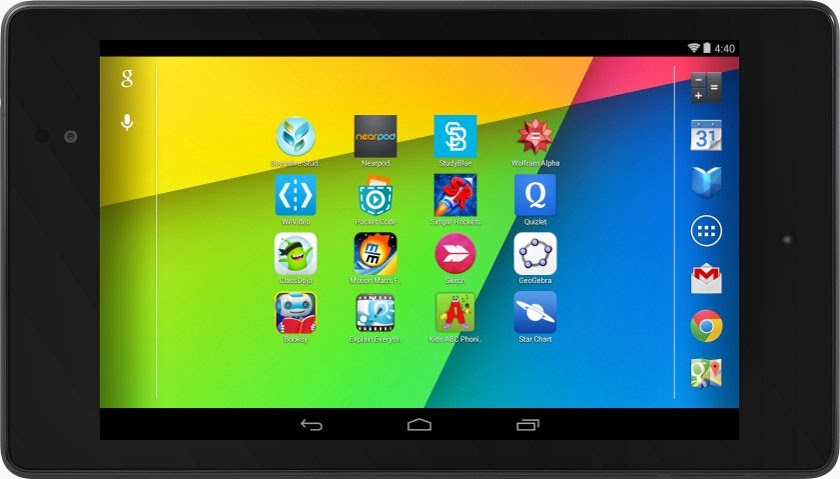


If you've built an Android app that would be awesome for schools—or even have an idea for one—now's the time to jump in. We'll put you one click away from getting purchased and installed by entire school districts. Class Dojo, Explain Everything, Nearpod, and Socrative are already getting discovered in Google Play for Education.


How to join Google Play for Education


If you already have an educational Android app you can use the Google Play Developer Console to mark your apps for inclusion in Google Play for Education. Marking your app identifies it as suitable for the US K-12 educational market and queues it for educator approval. These educators perform a first-pass qualification of apps, assigning the appropriate subject, grade, and common core standards metadata, while evaluating if the app meets the Google Play for Education criteria for classroom use.


Designing great apps for classrooms


High quality apps are top priority for teachers. Whether you already have an existing K-12 educational app or are looking to build one, take a look at our detailed requirements and guidelines—which we have compiled for you based on educator feedback—to ensure your app is appropriate for a K-12 environment. Also ensure that your app is optimized for both 7” and 10” Android tablets. Then, upload your new or updated app through the Developer Console, opt in to Google Play for Education, and publish. We will email you when your app has been evaluated.


For more information, please visit the Google Play for Education pages on the Android developer site. We are excited to be supporting schools to bring the best content and tools to their students. We look forward to seeing your app on Google Play for Education.


Friday, October 11, 2013

Tablet changes in Google Play coming up November 21

Posted by Ellie Powers, Google Play team


Fueled by the Nexus 7 and other great devices, more than 70 million Android tablets have been activated. Thousands of developers have already designed their apps to look great on tablets, and with the holidays fast approaching, we’re making it even easier for the next wave of tablet owners to discover great apps and games.


Play Store tablet changes coming up on November 21


Earlier this year, Google Play added a “designed for tablets” section, where users could easily discover apps that look great on their 7”- and 10”-tablets. This section includes only apps and games which meet criteria and guidelines we established last year. (Here’s an overview if you missed it.) Developers who invest the time to meet the criteria are seeing great results; take Remember The Milk, which saw an 83% increase in tablet downloads from being in this section. (see the whole story here).


On November 21, the Play Store will make a series of changes so it’s even easier for tablet users to find those apps that are best for their devices. First, by default, users browsing Google Play on a tablet will now see apps and games that are designed for tablets on the top lists (Top Paid, Top Free, Top Grossing, Top New Paid, Top New Free, and Trending). Tablet users will still be able to switch the view so they can see all apps or games if they choose. Also starting November 21, apps and games that do not meet the “designed for tablets” criteria will be marked as “designed for phones” for users who browse the Play Store on tablets.


You’ll want to make sure that your app is designed for tablets; read more about how to do this at the end of this blog post.


Make sure your app is ready!


If you want to be sure your app is included in the “Designed for tablets” view in time for the November 21 Play Store changes, go to the Developer Console to check your tablet optimization tips. If you see any issues listed there, you’ll need to address them in your app and upload a new binary for distribution. If there are no issues listed, your app is eligible to be included in the “Designed for tablets" view in the top lists.


Also, make sure to read the full tablet quality checklist to understand how to build outstanding tablet experiences.


Everyday, thousands of Android developers are taking advantage of the tremendous Android tablet opportunity. The flood of new users coupled with the increased screen size means new user experiences, more engagement and more monetization opportunities. We’re excited to see what you do!